
- Other5Characters install
- Other5Combat install
Install them from the launcher's CREATE page. Other5Characters has the mannequin, its poses and aim offsets; Other5Combat the guns' fire and reload montages. Everything here is Blueprint: no C++. What each plugin provides
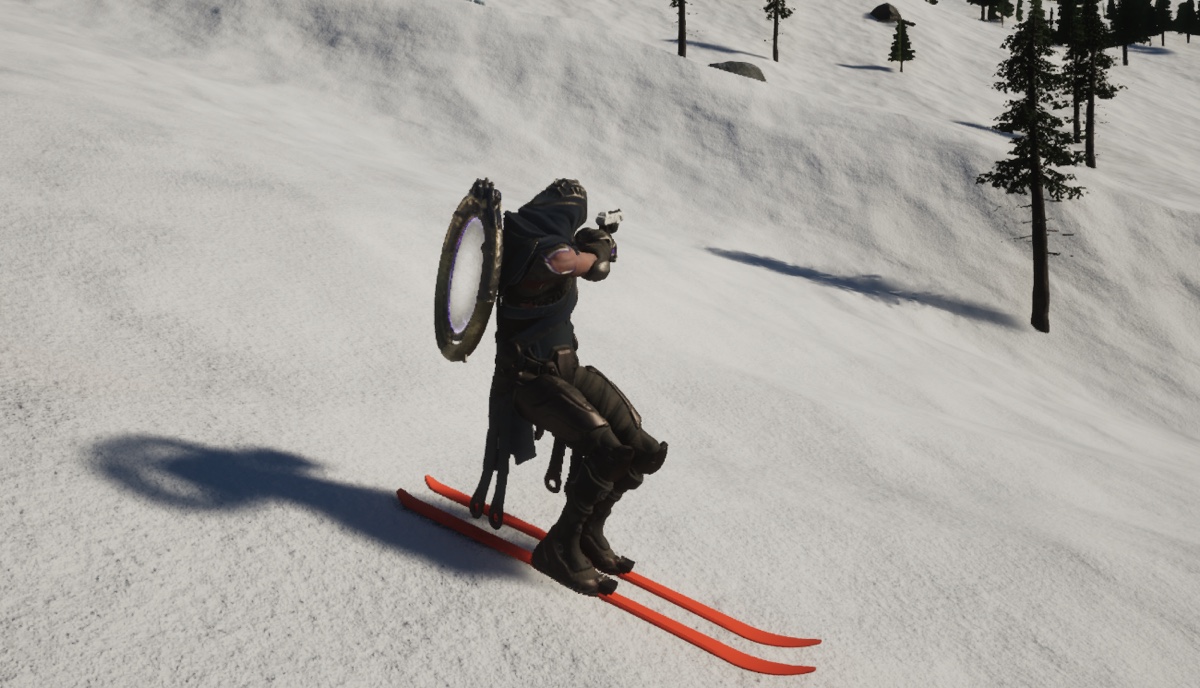
What you end up with
- Both feet on the skis, pointing along them, whatever the idle pose does with its feet.
- The hips drop and sit back, and the spine leans forward, the faster you go.
- The upper body turns and aims where the player looks, and plays fire and reload montages, while the gun stays on target even crouched.
- Guns and hats that stay in the hands and on the heads of retargeted characters (Countess, Gideon).
Learn more first (Epic's docs)
- Animation Blueprints: the Event Graph works out numbers, the Anim Graph turns them into a pose.
- Blend nodes (Layered Blend per Bone, Blend Poses by Bool).
- Two Bone IK and Transform (Modify) Bone.
- Aim Offsets and Montages and Slots.
How it fits together
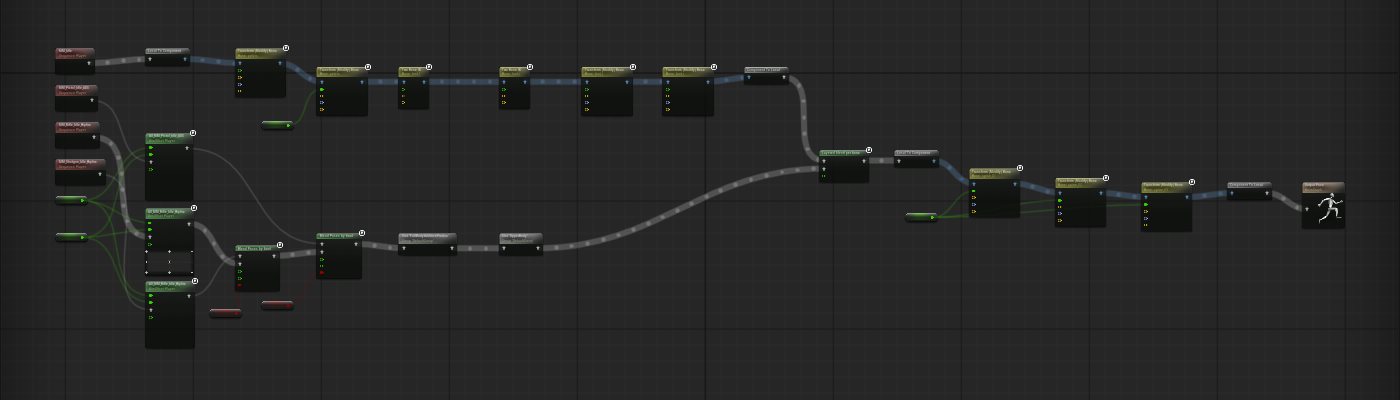
Two chains meet in a Layered Blend per Bone. The legs are placed, not played: every mannequin pose,
even plain MM_Idle, stands with the feet staggered and turned out, which looks broken on skis.
So the legs take the idle pose and IK moves each foot onto its ski. The upper body is played: the gun's
pose through its aim offset, then two montage slots. After the blend, the spine leans with speed.
1. Make the Animation Blueprint
- In your plugin's folder: Add > Animation > Animation Blueprint. Skeleton
SK_Mannequin, parent class AnimInstance. Name it e.g.
ABP_Skier. - Add these variables:
SkiCrouch(Float: 0 tall, 1 full crouch),AimYawandAimPitch(Float: where the player aims, relative to the skis),bArmsPistolandbArmsShotgun(Boolean: how to hold the gun; both false is a rifle),LeanDegrees(Float, default 24).
2. The Event Graph
On Event Blueprint Update Animation, with Try Get Pawn Owner (check it Is Valid):
- Crouch. Speed = Vector Length of the pawn's Get Velocity. Target = Clamp(0.3 + speed / 2800, 0, 1): 30% standing still, full from about 70 km/h. Set SkiCrouch to FInterp To(SkiCrouch, target, Delta Time, 4), so it eases in.
- Aim. Delta (Rotator) of Get Base Aim Rotation and Get Actor Rotation. AimYaw = its Yaw (clamped to -90..90). AimPitch = its Pitch + LeanDegrees × SkiCrouch × Cos (Degrees)(AimYaw) (clamped). That extra pitch keeps the gun on target when the body leans (step 6).
- Which gun. Cast the pawn to your character, get the gun in hand and set
bArmsPistol/bArmsShotgunfrom it.
3. The legs
In the AnimGraph, in a row, each output into the next:
- Play MM_Idle, then Local to Component (skeletal controls work in component space).
- Transform (Modify) Bone
pelvis: Translation Mode Add to Existing, Space Component Space, Translation (0, 0, -5); Rotation and Scale Ignore. - Another the same with Translation (0, -10, -34) (down and back: mesh +Y is forward) and SkiCrouch into its Alpha.
- Two Bone IK
foot_l: Effector Location (13, 4, 8.5), Joint Target (15, 60, 50) (in front of the knee), both in Component Space; Allow Stretching off. Thenfoot_rwith (-13, 4, 8.5) and (-15, 60, 50). - Transform (Modify) Bone
foot_l: Rotation Mode Replace Existing, Space Component Space, Rotation (85.6, 63.8, 66.8);foot_r(-86.1, -109.2, -69.4). These are MM_Idle's own foot rotations turned until the toes point straight ahead. - Component to Local.
As the hips drop with SkiCrouch, the IK keeps the feet on the skis, so the knees bend more the faster you go.
4. The upper body
- Per kind of gun, a pose into its aim offset:
MM_Pistol_Idle_ADS→AO_MM_Pistol_Idle_ADS;MM_Rifle_Idle_Hipfire→AO_MM_Rifle_Idle_Hipfire;MM_Shotgun_Idle_Hipfire→ the rifle's. AimYaw into each aim offset's X, AimPitch into Y. - Two Blend Poses by Bool pick one:
bArmsShotgun(shotgun or rifle), thenbArmsPistol(pistol or that). - Slot FullBodyAdditivePreAim (fire recoil), then Slot UpperBody (reloads). A montage only shows if a Slot with its slot's name is in the graph.
5. Join them: Layered Blend per Bone
Base Pose = the legs, Blend Poses 0 = the upper body. In its Details > Layer Setup > Index [0] > Branch Filters, add spine_01 with Blend Depth 0, and turn on Mesh Space Rotation Blend (the chest faces where you aim even though the hips lean).
The one setting that breaks everything: with no branch filter, the blend adds nothing and the whole body plays the legs' idle. The upper body stays rigid, facing forward, and never aims, fires or reloads. If yours is frozen, check this first.
6. Lean with speed, keep the aim
- After the blend: Local to Component, three Transform (Modify) Bone for
spine_01,spine_02,spine_03(Rotation Mode Add to Existing, Space Component Space, Rotation Roll 8, Translation and Scale Ignore, Alpha = SkiCrouch), then Component to Local into the Output Pose.
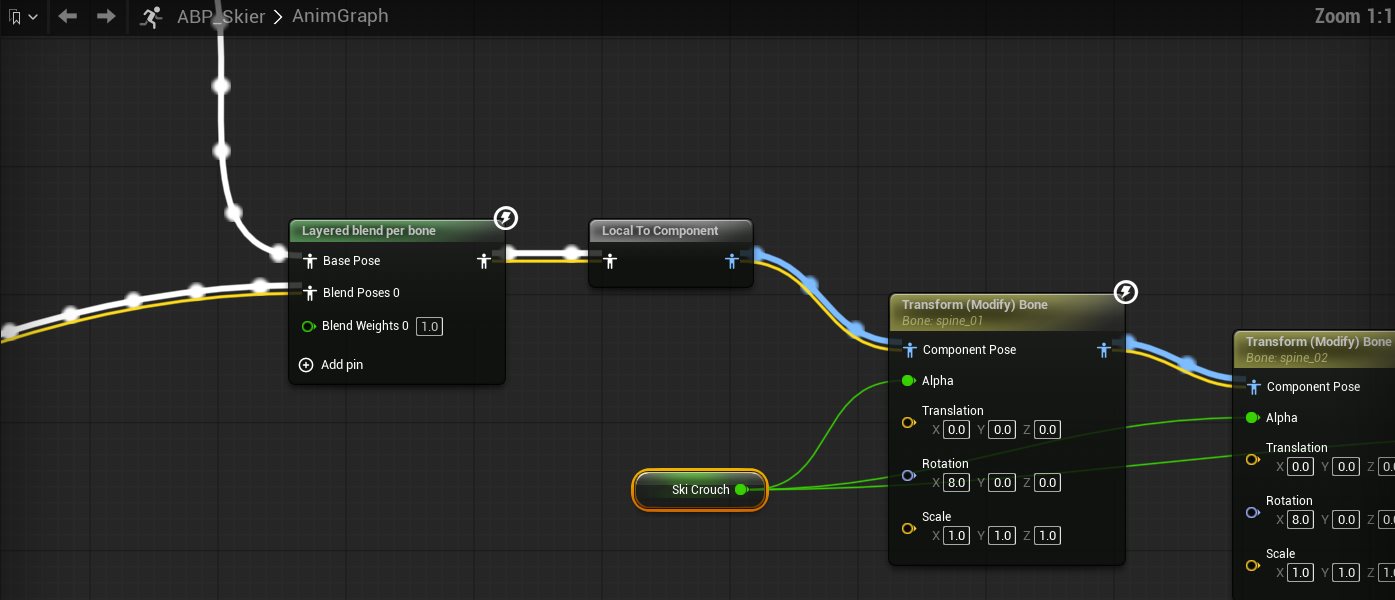
- Why Component Space and Roll: there, X is the character's sideways axis and +Roll tips the spine forward. In Bone Space the lean follows each spine bone's own axes, which are tilted (about 23 degrees on the mannequin): the torso also tips sideways, and the gun aims low to one side and high to the other.
- The lean tips the arms and gun down, but only when aiming ahead: aimed to the side it just tilts the gun about its barrel. That's why step 2 adds LeanDegrees × SkiCrouch × cos(AimYaw) to the aim pitch. The animators' own aim-up poses lift the arms back, and the gun points where the player aims. (SKIvSKI measured it within a degree of standing still, from 80 degrees left to 80 degrees right.)
Compile, Save, and try SkiCrouch at 0 and 1 in the preview.
7. Use it on your character
- Select your character's Mesh and set Anim Class to
ABP_Skier. - Attach the gun to the weapon_r socket (Other5Combat's guns point along +Y: turn them -90 yaw).
- Fire and reload with Play Anim Montage and Other5Combat's montages, e.g.
AM_MM_Pistol_Fire,AM_MM_Pistol_Reload.
8. Guns in a retargeted character's hands
A character on its own skeleton (Add a character) is shown as its own mesh, while the mannequin animates unseen and the IK Retargeter copies its pose. Anything attached to the mannequin's sockets follows the mannequin's hand and head, and the hero's arms and neck are different lengths, so the gun floats beside the hand and a hat beside the head. In your character Blueprint, every frame from Event Tick:
- Find the shown mesh: Get Components by Class (Skeletal Mesh Component); the one that isn't the character's Mesh, Is Visible, and whose Get Attach Parent is the Mesh. (Cast the array items to Skeletal Mesh Component in a small helper function: in a function a cast ends the flow.) None: use the Mesh.
- Hand gap = shown mesh's Get Socket Location(
hand_r) − the Mesh's (hand_r); head gap the same withhead. - Gun Set Relative Location = your grip offset + Unrotate Vector(hand gap, the Mesh's Get Socket
Rotation(
weapon_r)). Hat: Unrotate Vector(head gap, the Mesh's socket rotation athead).
The gun stays attached to the mannequin, so it still turns and aims with the arms; it's only moved by how far the visible hand is from the hidden one. With a mannequin skin the gap is zero.
Tuning
| What | Where | SKIvSKI |
|---|---|---|
| Crouch depth | the second pelvis node's Translation | (0, -10, -34) |
| How fast it gets there | the crouch target | 0.3 + speed / 2800 |
| Feet apart | IK Effector X | 13 cm |
| Lean | spine Roll × 3, and LeanDegrees (keep equal) | 8 each, 24 |
Troubleshooting
- Upper body frozen, no aiming, firing or reloading: the Layered Blend per Bone has no branch filter (step 5).
- Firing or reloading doesn't show: no Slot node with the montage's slot name (step 4).
- Crouched, the gun aims low to one side and high to the other: the lean is in Bone Space (step 6).
- Legs stretch or knees bend backwards: Allow Stretching is on, or the Joint Target is behind the knee.
- Gun floats beside a hero's hand: step 8.
SKIvSKI builds the same Animation Blueprint from scripts (its Docs/SkiStanceAnimation.md,
Docs/Scripts/BuildAnimGraph.ps1); the numbers are the same.
Next
- New characters to put on skis: Add a character.
- Tuning gameplay numbers: Tuning.