
- Other5Characters install
Install them from the launcher's CREATE page. Your player character needs an Other5 Character Skins component: Other5Combat's hero has one, and so do CubeEscape's and SKIvSKI's. What each plugin provides
What you end up with
- The character in your project, animated by the same mannequin animations every Other5 character uses, through an IK Retargeter. Running, jumping, aiming, firing, reloading and dying all work straight away.
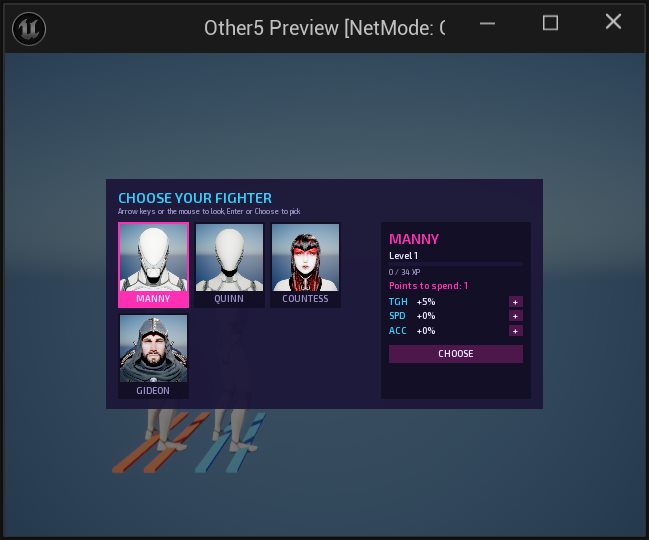
- A skin on your player character, so players pick it in Choose your fighter and in Settings > Character. Its portrait is drawn in game; you don't make one.
- Every value (name, mesh, retargeter, hidden parts, starting fighter stats) set on the Blueprint.
This guide follows one real addition: Gideon, added to Other5Characters and then to SKIvSKI and CubeEscape. The same steps work for any humanoid character from Fab, or one you made yourself.
How Other5 does characters
Every Other5 player character runs on Unreal's mannequin skeleton (SK_Mannequin). Its animations,
weapons, aiming and hit reactions all assume that skeleton. So there are two kinds of skin:
- A mesh skin, for a character already built on the mannequin skeleton (Manny, Quinn, many Fab characters made for UE5). You just set its mesh.
- A retargeted skin, for a character on its own skeleton, like every Paragon hero. The mannequin keeps animating, hidden, and an IK Retargeter copies its pose onto the visible character every frame. Gideon is one of these, and this guide shows the extra steps it needs.
1. Get the character on Fab
Open the listing in your browser or in the editor's Fab panel. For Gideon that's Paragon: Gideon. Sign in with your Epic account, read the licence and click Add to My Library.
Nobody can do this step for you: accepting a licence is your own agreement with Epic. Gideon is free under the Fab Standard License, which lets you use him in your game. You may not use the PARAGON trademark to name or advertise it.
2. Import it with the editor's Fab panel
In the Other5 Creator, open Window > Fab, sign in if asked (the person icon at the top right), find the listing (or open My Library) and click Add to Project.
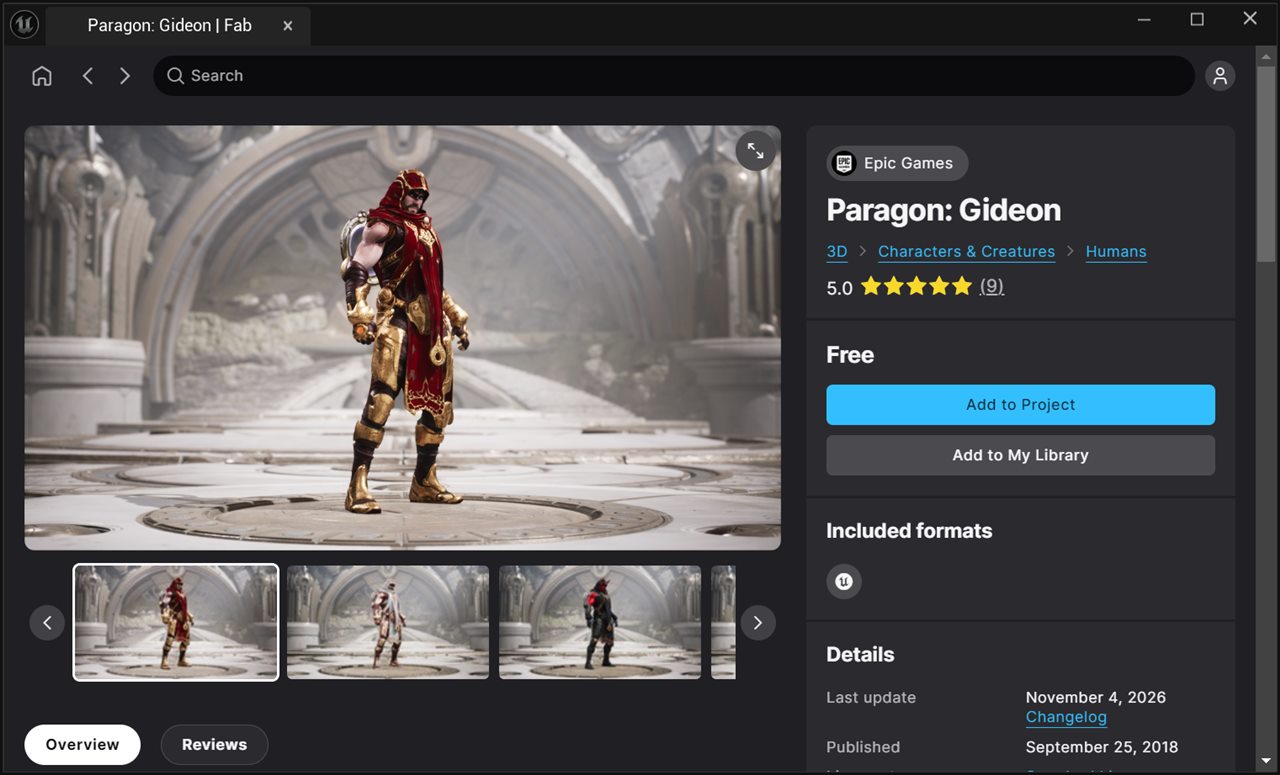
The pack lands in Content/ParagonGideon: about 2,000 files and 2 GB, with animations, voice
lines, effects, four alternate skins and a sample character. You'll keep only what the character's mesh
needs (step 4).
Using git for your Creation? Add /Content/ParagonGideon/ to .gitignore
so the licensed files never get committed.
3. Check the character fits
Open the character's mesh (for Gideon, ParagonGideon/Characters/Heroes/Gideon/Meshes/Gideon) and
look at two things:
- Material slots. Paragon meshes sometimes carry props as separate material slots. Countess has her
swords on her back (
M03_Swords_holster), and her skin hides that slot so she doesn't hold swords and a rifle at once. Gideon has no weapons: the ring on his back is his portal (M05_Portal_skin05), part of his look, so nothing is hidden. - Skeleton. In the mesh's details, Skeleton says which skeleton it uses. Gideon uses his own
Gideon_Skeleton, so he's a retargeted skin. His four alternate skins (Inquisitor, Mephisto, Tough and Undertow) share that skeleton and his physics asset, so adding one later only costs its own meshes and textures.
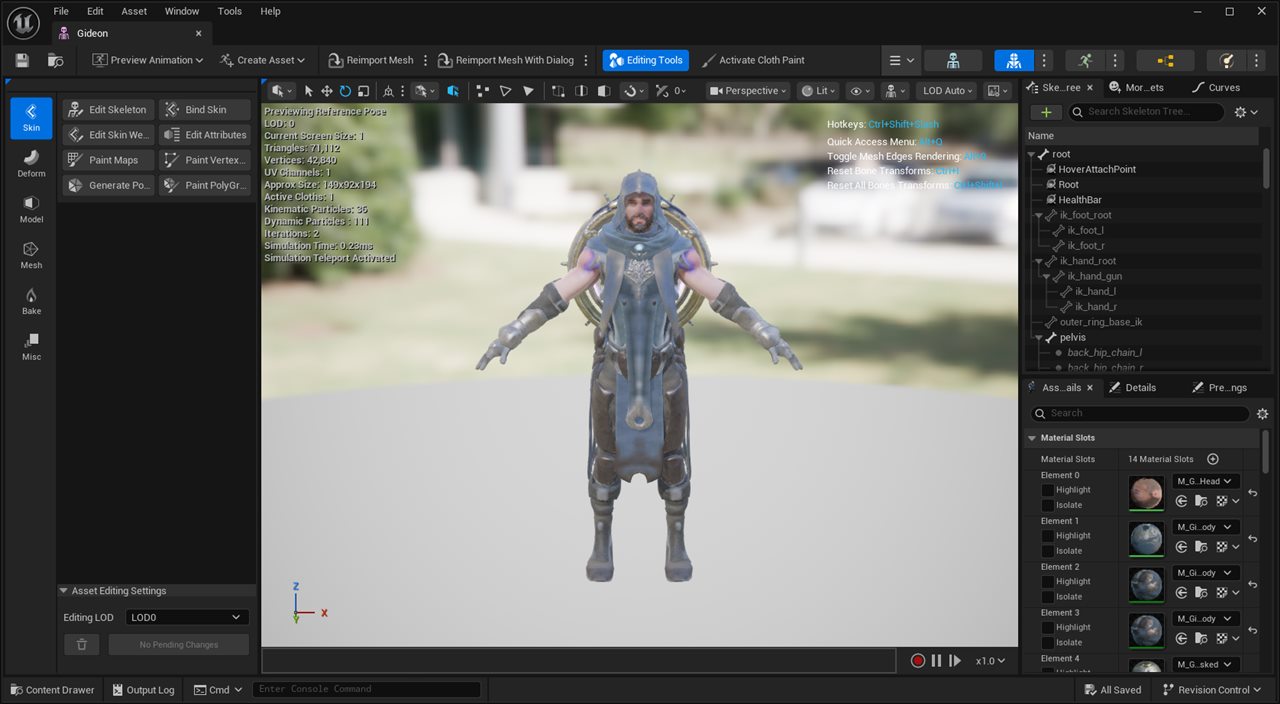
If the skeleton is SK_Mannequin, skip the IK Rig and Retargeter in step 4: set the
mesh as the skin's Mesh in step 5 and you're done.
4. Move it into your plugin, then make the IK Rig and the Retargeter
Move the mesh and what it uses
Your Creation's plugin should hold everything it ships, so move the character's mesh and what it uses
(materials, textures, skeleton, physics asset) into a folder of your plugin, keeping the folder structure.
For Gideon that's Other5Characters/Gideon.
- Right-click the mesh > Reference Viewer (or Size Map) to see everything it uses.
- Select those assets, drag them into the matching folders of your plugin and pick Move Here.
- Right-click the old
ParagonGideonfolder > Fix Up Redirectors in Folder.
The animations, sounds and effects stay behind: the character plays the mannequin's animations. For Gideon that's 122 assets moved.
Make the IK Rig
An IK Rig tells Unreal how the character's bones form a spine, arms, legs and fingers.
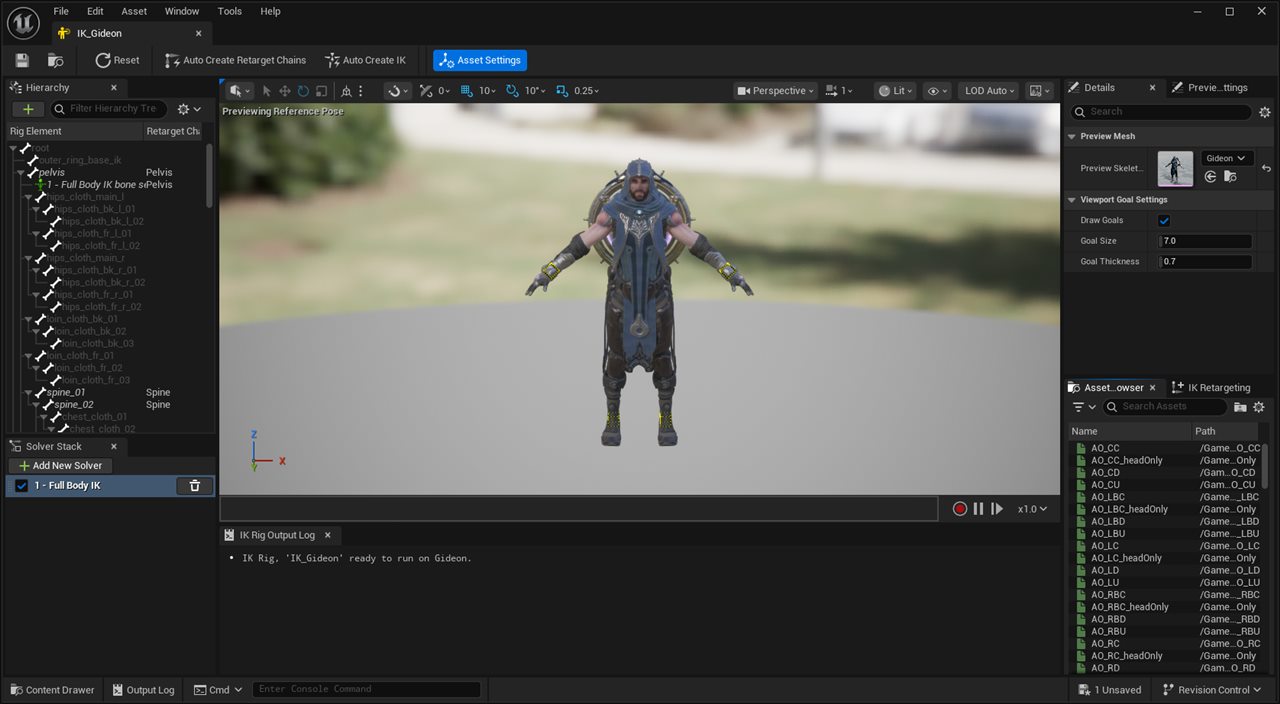
- In your plugin, right-click > Animation > Retargeting > IK Rig, pick the
character's mesh and name it
IK_Gideon. - Open it and click Auto Create Retarget Chains, then Auto Create IK. The retarget root
should be
pelvis. - Check the chains list: for Gideon there are 21 (spine, neck, head, both arms, both legs and the fingers), the same as Countess. The output log says the IK Rig is ready to run.
Make the IK Retargeter
The retargeter maps the mannequin's chains onto the character's.
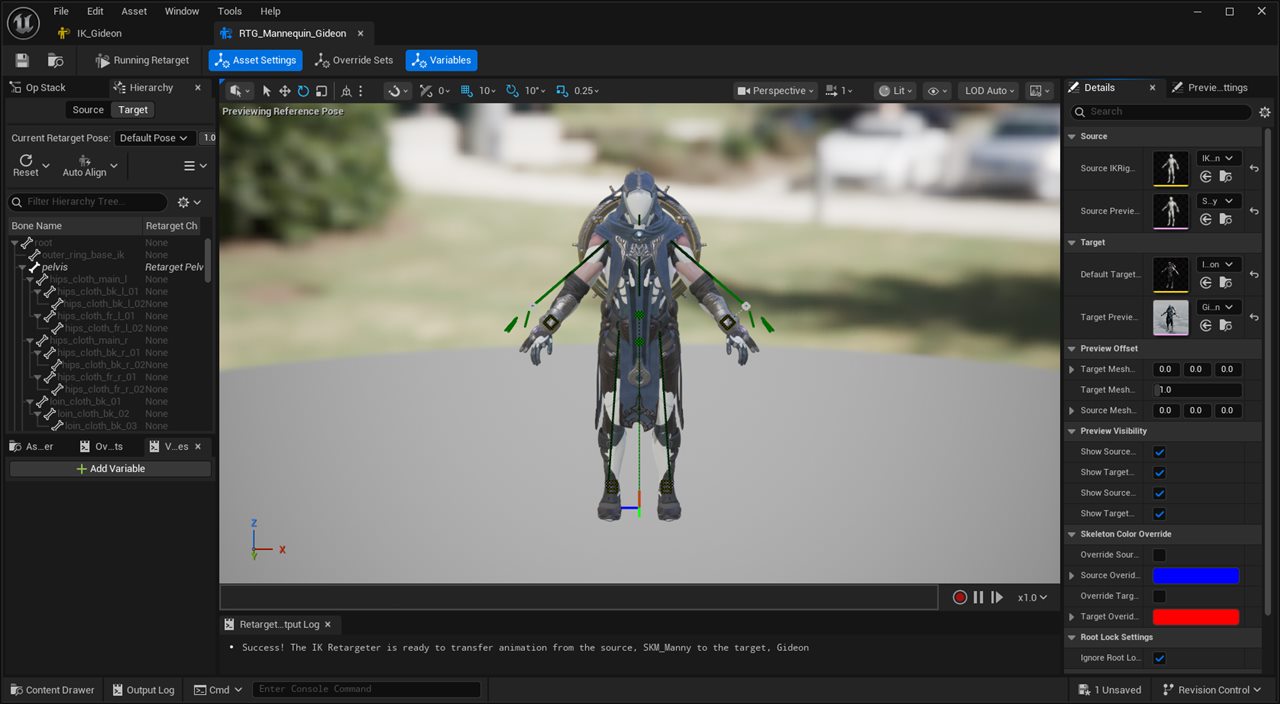
- Right-click > Animation > Retargeting > IK Retargeter, name it
RTG_Mannequin_Gideon. - Set the Source IK Rig to
IK_LyraMannequin(inOther5Characters/Countess/Rigs) and the Target IK Rig to your newIK_Gideon. - The chains map by name. The output log should say "The IK Retargeter is ready to transfer animation from the source, SKM_Manny to the target, Gideon". Both are in an A-pose, so the default retarget pose works; a character in a T-pose needs its retarget pose adjusted to match.
Other5Characters has a script that does all of step 4 for a Paragon hero:
Docs/Scripts/AddParagonHero.py. Edit HERO, IMPORT_ROOT and
MESHES at the top, then type py "<path>/AddParagonHero.py" into the console box
at the bottom of the editor.
5. Add the skin to your player character
Open your player character Blueprint, select its Other5 Character Skins component, and add an element to Skins:
| Field | Gideon's value |
|---|---|
| Display Name | Gideon |
| Mesh | empty (he isn't on the mannequin skeleton) |
| Retargeted Mesh | Other5Characters/Gideon/Characters/Heroes/Gideon/Meshes/Gideon |
| Retargeter | Other5Characters/Gideon/Rigs/RTG_Mannequin_Gideon |
| Hidden Material Slots | none (Countess: M03_Swords_holster) |
| Toughness / Speed / Accuracy | 2.5 / 0 / 2.5: the fighter stats this character starts with, in percent (less damage taken, faster movement, tighter aim). Small values keep characters balanced. |
Turn on Choose On Join to show the character select screen when a player joins, and Menu Button to offer it from the menu. Choose your fighter lists every skin; the Settings row shows up to four.
Several player Blueprints to update? Other5Characters' Docs/Scripts/AddSkinToCreations.py
adds a skin to each of them at once.
6. Test it
Open one of your maps and press Play. Pick the character in Choose your fighter, then run, jump, aim, fire, reload and die, and watch that the hands, feet and head follow.
- If the editor warns that GideonPlayerCharacter failed to compile, click Play in Editor
anyway. That's the pack's old sample Blueprint, made for UE4's input, and nothing of yours uses it.
Deleting
Content/ParagonGideononce you're done removes it. - Feet sliding or hands drifting? Open the retargeter and compare the two poses: a different starting pose (A-pose against T-pose) is the usual cause.
- A prop in the character's hands or on its back clashing with your weapons? Add its material slot to Hidden Material Slots.
7. Share your Creation
Publish with the Other5 Tool as usual (Your first Creation). Only what the skin uses is cooked into your Creation's paks, under your own licence. Never zip or share the plugin folder with the character's source files in it.
Good to know
- Size. Gideon's default look is about 430 MB of source, mostly 4K material-layer textures. Each extra skin adds its own meshes and textures: Mephisto +75 MB, Tough +291 MB, Inquisitor +366 MB, Undertow +480 MB. Cooked paks are smaller, and capping the textures' Maximum Texture Size at 2048 or 1024 cuts them further.
- Characters in Other5's plugins. Other5Characters already has Countess and Gideon set up this way, as stand-ins until you get their art: see Get the art.
- Things you attach to the character. With a retargeted skin, anything attached to the mannequin's
sockets (a gun in
weapon_r, a hat onhead) follows the hidden mannequin, not the hero you see, so it floats beside the hero's hand or head. Ski stance, step 8 shows the few Blueprint nodes that fix it. - Your own characters. A character you made yourself goes in the same way. If it's on the mannequin skeleton, it's just a mesh skin.
Next
- Get the real art for the plugins' characters: Get the art.
- See everything Other5Characters provides: What the plugins provide.